Intelligencia UrlRewriter
在IIS6中.net项目伪静态重写路径的配置方法图解和示例。
1、右键点击 要设置网站的网站
2、属性 ——》主目录 ——》配置——》
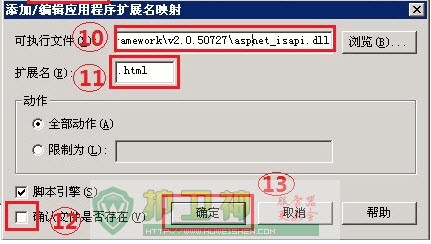
3、如右侧窗口,找到 .aspx 扩展名——》编辑——》复制 可执行文件的路径——》关闭
4、点击 添加——》粘贴 刚复制的 可执行文件路径
5、扩展名填写 .html (如果是 .htm 或者 任意你想要的扩展都可以 前提是以后的应用程序扩展列表里边没有该扩展)
6、不选中 确认文件是否存在
7、确定
iis6 web.config 伪静态配置方法
1、参数用()括起来,使用 $1 来获得参数。
2、多个参数的时候使用&分割。
3、把Intelligencia.UrlRewriter.dll添加到bin目录
<?xml version="1.0"?>
<configuration>
<configSections>
<section name="rewriter" requirePermission="false" type="Intelligencia.UrlRewriter.Configuration.RewriterConfigurationSectionHandler, Intelligencia.UrlRewriter"/>
</configSections>
<system.web>
<httpModules>
<add type="Intelligencia.UrlRewriter.RewriterHttpModule, Intelligencia.UrlRewriter" name="UrlRewriter"/>
</httpModules>
</system.web>
<rewriter>
<!--首页-->
<rewrite url="~/default.html$" to="~/default.aspx" processing="stop"/>
<!--新闻-->
<rewrite url="~/news/list-([A-Za-z0-9-]*).html$" to="~/NewsList.aspx?typeUrl=$1" processing="stop"/>
<rewrite url="~/news/list-([A-Za-z0-9-]*)-([0-9]*).html$" to="~/NewsList.aspx?typeUrl=$1&page=$2" processing="stop"/>
<!--新闻详细-->
<rewrite url="~/news/([A-Za-z0-9-]*).html$" to="~/NewsDetail.aspx?url=$1" processing="stop"/>
</rewriter>
</configuration>